
In this blog post, we will cover the necessary steps to train a custom image classification model and test it on images.
The Ikomia API simplifies the development of Computer Vision workflows and provides an easy way to experiment with different parameters to achieve optimal results.
Get started with Ikomia API
You can train a custom classification model with just a few lines of code. To begin, you will need to install the API within a virtual environment.
How to install a virtual environment
pip install ikomia
In this tutorial, we will use the Rock, Paper, Scissor dataset from Roboflow.
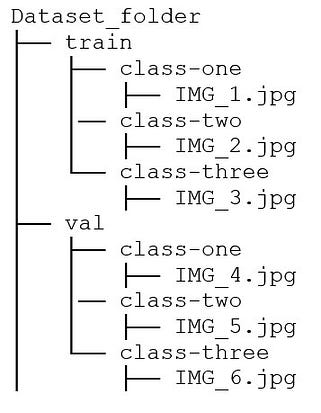
Ensure that the dataset is organized in the correct format, as shown below:
(Note: The “validation” folder should be renamed to “val”.)
Run the train ResNet algorithm
You can also charge directly the open-source notebook we have prepared.