
You probably never heard of them, but you will love them once you know.
CSS.
A language which is responsible for nearly every website in the world.
With so many properties, CSS is pretty huge. Finding good properties among them is like trying to read a binary file by yourself (pls don’t try it).
Which is why I have done that for you (the CSS, not the binary).
Here are 10 properties that you may not use much, or have never heard of, but will love once you know them.
Photo by Markus Spiske on Unsplash
Custom Scrollbars
Let’s change the width and color of the scroll bar. Also, let’s make it a little round as well.
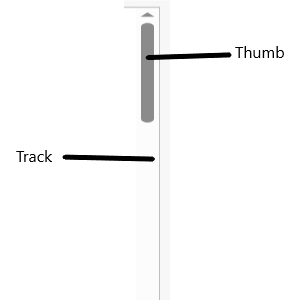
Below are the parts of a scroll bar.
 =
=
What the different parts of a scroll bar are | Image by Author
We use ::-webkit-scrollbar to change the properties.
/* Set the width of the scroll bar*/
::-webkit-scrollbar{
    width: 10px;
}
/* Change the track to a blue color and give a round border */
::-webkit-scrollbar-track{
    background-color: blue;
    border-radius: 10px;
}
/* Making the thumb (which shows how much you've scrolled) a gray color
  and making it round */
::-webkit-scrollbar-thumb{
    background: gray;
    border-radius: 10px
}
/* A dark gray color when hovered overn */
::-webkit-scrollbar-thumb:hover{
    background: darkgray;
}
The result of the code | Image by Author
Note: This is a non-standard property, and without -webkit-, it will not work.
Cursors
Change how the cursor looks when you mouse over an element.
/* An element with class 'first' */
.first{
    cursor: not-allowed;
}
/* An element with class 'second' */
.second{
    cursor: zoom-in;
}
/* An element with class 'third' */
.third{
    cursor: crosshair;
}
Result of the above code. The cursor on different elements | Image by Author
Scroll behavior
The scroll behavior can make a smooth scroll, to make transition from one section to another smoother.
Add this simple line and see the effect for yourself.
html{
  scroll-behavior:smooth;
}
Instead of simply snapping the page from one section to another, it scroll up/down to the section.